This semester, I took a dual enrollment Java programming class at Seminole State College of Florida. We covered everything from the basics to inheritance and custom exceptions.
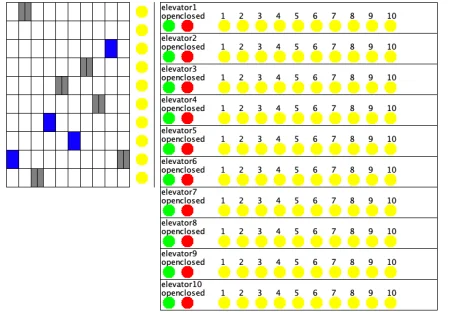
One of the last projects we did of the semester was the ArrayList of Elevators using Java AWT and objectdraw. Objectdraw is not part of the Java Development Toolkit, but it is commonly used to teach introductory Java GUI programming. For the project, we had to use Java AWT and objectdraw to create a set of elevators and a control panel for each one.
We had to build 10 elevators and their shafts for floors up to 10 stories tall. These elevators had to be part of one big ArrayList and were controlled by two control panels. The main control panel had open and close buttons for each elevator to open or close the door for the elevator of choice. Each elevator had its own row of numbered buttons to match the floor where it sent the selected elevator. The secondary control panel had a column of buttons next to each floor to call an elevator to that floor. An algorithm was programmed into the code to bring the elevator that made the most sense to that floor. For example, if elevator one was going up while on the seventh floor, elevator two was going up while on the second floor, and the button on the fourth floor was pushed, then elevator two would go to the fourth floor.
Overall, the project was not super challenging for me. The hardest part was the layout and figuring out the spacing between each object on the screen. The buttons had to be spaced out enough so that the mouse click could be appropriately tracked. If this was not precisely correct, the program might not run the way it should.
The biggest thing I took out of this project was to make sure you have one thing working before you try to make multiple. Once the first one is working, move on to the next. In the instance of this project, get one elevator drawn and working as it should, and then add a second, then a third, and then all the way to ten. If you try to complete all of the objects at the same time, if you have an issue with one, you will most likely have that same issue with all of them. If you have an issue with one object, you can make a change and test it again to see if it will work, if not, you can try something different. Ever since this project, I have completed all of my other programming projects one object at a time, and each time it has been so much easier to get the entire thing completed.